Core Creative Process
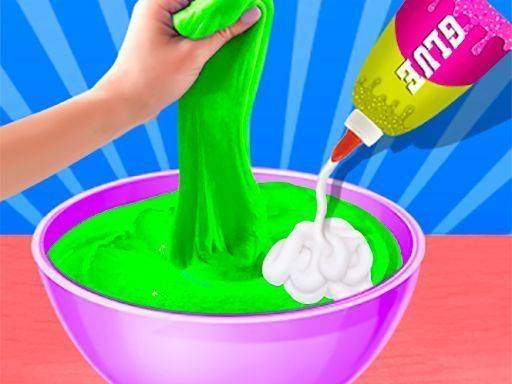
In Creative Slime Design Workshop, the main activity revolves around building a slime base from simple components. Players start by mixing a binding agent with a liquid activator, watching the mixture transform into a stretchy, moldable material. This foundational step sets the stage for all further customization. The interface guides each action with clear visual cues, making it easy for anyone to follow along. There is no rush, and every batch can be adjusted by varying the ingredient proportions. This allows for subtle differences in texture and consistency from one creation to the next. The process mirrors real-world slime making but in a clean, digital environment that requires no physical cleanup.
Color Palette & Personalization
Once the base slime is ready, the next step involves selecting colors from a broad palette. Players can mix primary shades to produce secondary tones, or stick with a single vibrant hue. The color mixing system responds in real time, showing exactly how the slime will look as pigments are added. This encourages experimentation without fear of wasting materials. After achieving the desired color, users can incorporate a variety of decorative elements. Small sparkling particles, tiny beads, and themed stickers can be pressed into the slime surface. Each addition changes the visual and tactile feel of the final piece, making every session feel fresh.
Relaxed Pacing & Accessibility
The game is designed around a stress-free philosophy. There are no scores to beat, no levels to unlock, and no timers counting down. Players can pause at any moment and return later without losing progress. This makes it an ideal choice for winding down after a busy day or for introducing young children to digital crafting. The controls rely on simple taps or clicks, which keeps the learning curve flat. Even first-time players can produce satisfying results within minutes. The gentle background music and soft visual effects further enhance the calming atmosphere, allowing the mind to focus on the creative task at hand.
Family-Friendly Environment
Safety and inclusivity are central to the design. All content is appropriate for players of any age, with no violent or disturbing imagery. The game promotes positive values like patience, creativity, and self-expression. Parents can feel confident letting children explore the workshop independently. The lack of in-app purchases or external advertisements means there are no surprises or hidden costs. This creates a trustworthy space where families can enjoy quality time together. The simple premise also encourages conversation and collaboration, as siblings or friends can share ideas for new color combinations or decoration arrangements.
Endless Variation & Replayability
Because every combination of ingredients, colors, and decorations yields a different result, the game offers near-infinite possibilities. Players might create a glittery pink slime one day and a matte green one with embedded stars the next. The absence of a fixed goal means the only limit is imagination. Some may enjoy systematically testing every color blend, while others prefer spontaneous mixing. The game keeps no record of past creations, so each session starts with a blank slate. This encourages a mindset of exploration and discovery, where the process itself is the reward. For those seeking a gentle, creative outlet, this workshop provides a reliable source of inspiration.



Comments
0 comments